

 By
By As society becomes more tech-focused, mobile phone security becomes priority number one. Anyone buying a secondhand phone needs a phone’s IMEI number. The IMEI number will help locate lost phones and is even needed for an insurance claim. IMEI is short for International Mobile Equipment Identity. Every phone has a 15-digit IMEI serial number. No two phones in the world share the same IMEI, making IMEI numbers digital fingerprints.
To keep your digital safety on lock, you must determine IMEI significance and know how to locate the numbers. We will teach you to check your IMEI number records and show you how to find your IMEI number(s). We will even provide steps to verify safety and security against fraud for the number you collect.
What is IMEI and Why Does it Matter?
After this explanation, we will provide detailed account of IMEI functions. First, it is important to understand: when your cellular device is lost or stolen, your provider can blacklist your device on their network. The phone will be unable to connect to cellular networks and internet service, leaving thieves with a useless phone.
When it comes to buying secondhand devices, knowing how to check an IMEI number can help you avoid buying stolen devices and devices that have been blocked by carriers. Buying secondhand devices can save you money and is an excellent choice, provided that you know what to look for when buying devices.
When it comes to claims and repairs, insurance companies and official repair centers utilize the IMEI number to ensure that the claimed device is the actual device that was purchased.
No matter the make or operating system, there are universal ways to find the IMEI number for your device. If you are trying to find the quickest ways to check the IMEI number of your device, here are the best options.
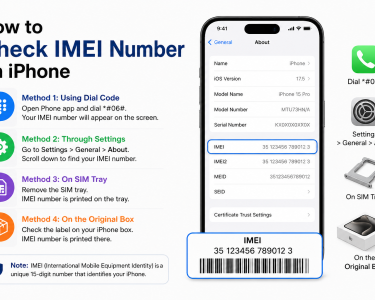
The fastest way to find an IMEI number is a universal dial code.
1. Open the Phone application.
2. Using the dialer, enter *#06#.
3. No need to hit the Call button. The moment you hit the last hashtag, your IMEI number, and other details will pop up.
For phones with dual SIMs, you will notice the existence of two separate IMEI numbers (IMEI 1 and IMEI 2). Each slot needs its unique number to connect to a cellular network at the same time.
2. Physical Hardware Examination
If the screen on your phone goes blank, becomes unresponsive to the software, or will not turn on, the number can still be accessed physically on the device:
– SIM Card Tray: On many high-end Android devices and most modern iPhones, the SIM card tray surface has micro-engraved text, and the IMEI can be found here. Use a SIM tool to gently remove the tray and observe the text up to the IMEI under bright light.
– Back Panel: If you own some Android devices, or older aluminum iPhones (e.g., iPhone 6), the lower back panel text, which is quite small, has the IMEI engraved.
– Battery: For those owning a device that has a removable battery and a removable back panel and was bought for less, take down the device, remove the back panel, take down the battery, and a white regulatory sticker will be there, which has the IMEI.
Individual Methods for Different Operating Systems
If you want to take the route of using your phone’s user interface, each operating system (Apple iOS or Google Android) has a slight variation, and here are the procedures of obtaining the IMEI number through the phone’s settings.
For Apple iOS (iPads and iPhones):
1. Access the Settings.
2. Select General and then About.
3. IMEI can be found, after which the page can be scrolled. For those who prefer to keep it, the number can be copied to the phone’s Clipboard by pressing it.
For Android Devices
Because Androids are customized by several manufacturers (such as Samsung, Google, Xiaomi, etc.), the steps outlined below may differ in name, but they remain mostly consistent by process.
1. Open you settings app.
2. Scroll to the absolute end. You should see About Phone (or About Device). Open that.
3. Tap Status or Status Information if the IMEI isn’t directly visible on the main About page.
4. You should see your 15-digit number clearly labeled.
How to Find Your IMEI If Your Phone is Lost or Stolen
Don’t panic if your phone is out of reach and you forgot to write down your IMEI! You can still find out how to check for imei number data remotely.
Method A: The Original Shipping Box
If you have the shipping box, look at or reach the backside. You should see a barcode. That code has your serial number and the 15-digit IMEI. You should always keep your shipping box for this reason.
Method B: Your Apple ID (iPhone)
If you have an iPhone, Apple saves your metric in your cloud.
1. On a browser, go to appleid.apple.com on a computer or other device.
2. Log in.
3. Scroll down to the section that says Devices and select your missing iPhone. A pop-up will show you the model, the serial number and the IMEI.
Method C: Separate Google Find My Device for Android Users
Using Google’s tracking technology to retrieve information related to lost phone devices can be done as follows:
1. On any browser, go to google.com/android/find
2. Sign in to the Google account associated with the lost phone.
3. In the side menu, click the small “i” (Info) icon next to your device’s name. A small window will open displaying your device’s IMEI.
How to Check an IMEI Number
When buying a used phone, finding the IMEI number is just the first step. Knowing how to verify the IMEI number will save you from getting scammed. A blacklisted or locked phone will not be usable with any of the major cell providers.
Use the following checklist to verify a phone safely before you pay.
| Step | Action | Purpose |
| 1 | Cross-reference numbers | Match the software IMEI (*#06#) with the physical IMEI on the SIM tray or box. If they don’t match, the phone’s hardware has likely been tampered with or modified illegally. |
| 2 | Use an online lookup tool | Input the 15-digit code into a reputable, official database to check its status. |
| 3 | Check carrier compatibility | Contact your network provider to ensure the device isn’t locked to a specific network competitor. |
Checking IMEI With Official Databases
To find out if a phone is blacklisted or stolen, you can enter the code in the verification websites.
1. CTIA Stolen Phone Checker: Should you reside in the US, this service is available to you for no cost to verify if the phone you are checking is a stolen phone.
2. Swappa IMEI Check: This is a paid service, but has shown to be a reliable tool to verify if the phone you are checking is a financed or blacklisted phone.
3. Official Carrier Portals: Most if not all major telecoms in the US and Europe (T-Mobile, Verizon, Vodafone, etc.) have a page in their websites for Bring Your Own Device (BYOD). They will let you enter an IMEI number and instantly tell you if the phone is compatible and allowed on their network.
If the phone checking services return with any result of “Blacklisted,” “Blocked,” or Stolen,” you should not proceed with buying that phone.
Finally
Knowing how to search IMEI number databases and check IMEI mobile number safety protocols through official databases is essential for anyone in possession of a mobile phone.
Make it a habit to find your IMEI, using the *#06# method, copy it down, and store it securely in a physical notebook or a password manager, today. You’ll avoid a lot of time, money, and stress if you ever need it to report a stolen device and hope to avoid using it.